GitHub Copilot and Copilot Studio: A Guide for Power Platform Developers
How GitHub Copilot and Copilot Studio fit together for Dynamics 365 and Power Platform teams: Dataverse MCP, agent mode, the Copilot harness and more.
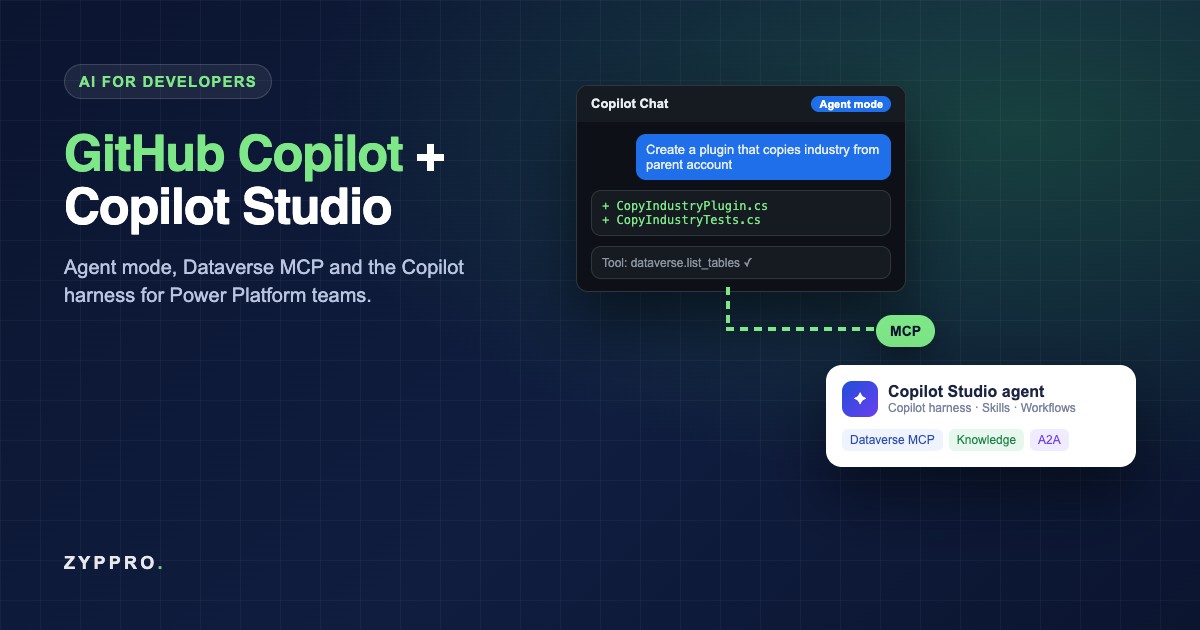
Microsoft has two "Copilots" that matter most to Dynamics 365 and Power Platform developers, and in 2026 they started working closely together:
- GitHub Copilot is the AI pair programmer inside Visual Studio Code, Visual Studio and the command line. It helps you write plugins, PCF controls, JavaScript web resources, code apps and deployment scripts.
- Microsoft Copilot Studio is the platform for building AI agents and workflows that your users and customers interact with.
The two meet through the Model Context Protocol (MCP), shared agent technology, and new ways to build Copilot Studio agents from your code editor. This guide explains what each tool does, how they connect, and how a Power Platform team can use them together safely and productively.
Part 1: GitHub Copilot for Dynamics 365 and Power Platform developers
What GitHub Copilot does
GitHub Copilot started as code completion and has grown into a full assistant:
- Inline suggestions as you type.
- Copilot Chat to explain code, write tests and answer questions about your repository.
- Agent mode in VS Code, where Copilot plans multi-step tasks, edits several files, runs terminal commands and fixes errors with your approval.
- Copilot CLI for working with an AI agent directly in the terminal.
- MCP support, so Copilot can call external tools and data sources.
Practical uses for Dynamics 365 and Power Platform work
1. Writing plugins faster
Describe the requirement ("on update of the opportunity, if estimated value changes by more than 20%, create a task for the owner's manager") and let Copilot draft the IPlugin class, retrieve logic and tracing. You still review the message, stage and filtering attributes.
2. JavaScript form scripts
Copilot is good at boilerplate such as formContext.getAttribute(), addOnChange, Xrm.WebApi calls and notification handling, which saves time on repetitive web resource code.
3. PCF controls and code apps TypeScript and React work is where Copilot shines: generating components, typing data models, writing tests and refactoring.
4. FetchXML, OData and Web API queries Ask Copilot to translate a requirement into a FetchXML query or Web API URL, then validate it in a tool such as FetchXML Builder.
5. Unit tests Generate tests with FakeXrmEasy or similar frameworks for plugin logic, increasing coverage without hours of setup.
6. ALM scripts and pipelines Copilot can draft Azure DevOps YAML or GitHub Actions workflows that export, pack and deploy solutions using Power Platform Build Tools or the Power Platform CLI.
Example prompts that work well
- "Create a post-operation plugin on Update of contact that copies the parent account's industry when the parent account changes. Use pre-image 'PreImage', trace each step and throw InvalidPluginExecutionException with a friendly message on errors."
- "Write a JavaScript web resource for the opportunity form that shows a form notification when estimated close date is in the past. Register it on OnLoad and on change of estimatedclosedate."
- "Generate FakeXrmEasy tests for this plugin covering: no parent account, parent account with industry, and parent account without industry."
- "Create a GitHub Actions workflow that exports the 'ZypproCore' solution from dev as managed and imports it into test."
The more specific the prompt (table names, message, stage, naming conventions), the better the result.
Connecting GitHub Copilot to Dataverse with MCP
The Dataverse MCP server exposes Dataverse tables and records as tools that MCP clients can use. In VS Code, you can add it as an MCP server and then use GitHub Copilot in agent mode to ask questions such as:
- "List the custom tables in this environment and their primary columns."
- "Show me the ten most recent cases with high priority."
- "Create a table called Equipment with name, serial number and purchase date."
Key points to know:
- The agent works under the signed-in user's Dataverse security roles, so it can only see and change what that user can.
- An admin must enable the Dataverse MCP server for non-Copilot Studio clients in the Power Platform admin center.
- Microsoft has announced usage-based billing for the Dataverse MCP server when used by agents outside Copilot Studio, so check current pricing before wide rollout.
- Microsoft has also released a Dataverse plugin (skills) for coding agents, including GitHub Copilot, that teaches the agent how to use the Dataverse MCP server, Dataverse CLI, Python SDK and Power Platform CLI.
Best practice: connect AI agents to development environments first. Avoid giving coding agents write access to production data.
Part 2: Copilot Studio in 2026
Copilot Studio has evolved from a chatbot builder into a full agent platform. Recent capabilities relevant to developers include:
- Agents with tools: knowledge sources, Power Automate and workflow tools, connectors, MCP servers and computer use for applications without APIs.
- Workflows: a redesigned workflow designer for deterministic, multi-step automation that agents can call.
- Agent skills: modular, reusable instructions that can be shared across agents.
- Connected agents: a main agent can delegate tasks to specialist agents (preview features continue to expand).
- Governance: Microsoft Entra Agent ID for agents, Microsoft Agent 365 onboarding, and admin controls over knowledge sources.
The "GitHub Copilot harness", now the Microsoft Copilot harness
The most interesting link between the two products is the harness. In August 2026, Microsoft announced the general availability of the GitHub Copilot harness in Copilot Studio, a foundation for reasoning-heavy agents and workflows. Microsoft has since renamed it the Microsoft Copilot harness.
The harness sits between the AI model and the agent. It decides when to call the model, what context to provide, and which tools, MCP servers or connected agents to use. Instead of following a fixed script, the agent can adjust its path to reach a goal. It can also create and edit Word, Excel, PowerPoint and PDF files, with tasks running in a sandbox governed by Copilot Studio.
In other words, the same kind of agentic engine developers use in GitHub Copilot now powers business agents in Copilot Studio. Copilot Studio can also help upgrade existing agents to the new harness and produce a migration report.
Billing note: agents, workflows and apps on the Microsoft Copilot harness are billed in Copilot Credits, so include consumption in your planning.
Part 3: Building Copilot Studio agents from VS Code and the CLI
In October 2026, Microsoft added the ability to connect MCP-compatible tools such as Visual Studio Code and GitHub Copilot CLI to Copilot Studio MCP. This means you can create, test, deploy and monitor Copilot Studio agents and workflows without leaving your code editor. Copilot Studio command-line tools have also been announced in preview.
Copilot Studio agents can also be exposed as MCP servers or Agent2Agent (A2A) agents (in preview), secured with Microsoft Entra ID. Other tools, IDEs and orchestrators can then call your business agent.
What this enables for teams
- Developer-friendly agent building: describe the agent you need in GitHub Copilot, then create and refine it in Copilot Studio through MCP.
- Source control and review: keep agent definitions, instructions and test cases alongside your code.
- Reuse: a Copilot Studio agent that knows your HR policies or product catalogue can be called from developer tools or other agents.
Part 4: A real-world scenario
Imagine a company using Dynamics 365 Customer Service that wants an AI agent for order and case enquiries.
- Data and APIs (GitHub Copilot): a developer uses GitHub Copilot in VS Code to build a Dataverse custom API that returns order status, writes the plugin, and generates unit tests. The Dataverse MCP server helps explore the schema in a dev environment.
- Agent (Copilot Studio): a maker builds the customer agent in Copilot Studio, adds the company's knowledge articles, connects the custom API as a tool, and creates a workflow to open a case when the agent cannot answer.
- Developer loop (Copilot Studio MCP): the developer tests and adjusts the agent from VS Code, keeping instructions and test questions in Git.
- Governance: the agent has its own Entra Agent ID, DLP policies control its connectors, and monitoring tracks usage and Copilot Credit consumption.
- Deployment: the solution moves through dev, test and production with pipelines.
Each tool does what it does best: GitHub Copilot speeds up building, and Copilot Studio runs the agent for end users.
Part 5: Security and governance checklist
AI tools that can read and change business data need guardrails:
- Least privilege: agents and developers should use accounts with only the roles they need.
- Separate environments: connect coding agents to development environments, not production.
- DLP policies: control which connectors and MCP servers agents can use.
- Human approval: keep approval steps for agent actions that write or delete data.
- Review AI-generated code: treat Copilot output like a pull request from a new team member.
- No secrets in prompts or code: use Azure Key Vault and environment variables.
- Monitor consumption: track Copilot Credits and MCP usage billing.
- Audit: use Dataverse auditing and agent analytics to see what agents did.
Part 6: Tips for getting the most out of both tools
- Give context. Open relevant files and describe business rules clearly; AI output improves dramatically with good context.
- Ask for small steps. Generate one plugin or component at a time and test it.
- Use custom instructions. Add repository instructions (naming conventions, publisher prefix, logging rules) so GitHub Copilot follows your standards.
- Build reusable skills. In Copilot Studio, package common instructions as skills shared across agents.
- Keep humans accountable. AI accelerates delivery, but architects and developers still own design decisions and quality.
Frequently asked questions
Is the "GitHub Copilot harness" the same as GitHub Copilot? No. GitHub Copilot is the developer assistant. The harness is the agent foundation inside Copilot Studio, originally named after GitHub Copilot and now called the Microsoft Copilot harness. They share agentic ideas but are licensed and used separately.
Do I need a GitHub Copilot licence to use Copilot Studio? No. Copilot Studio is licensed and billed separately (for example in Copilot Credits). GitHub Copilot is licensed per developer.
Can GitHub Copilot deploy directly to production? It can run commands you approve, but production deployments should go through pipelines with reviews and approvals, not from a developer's machine.
Is AI-generated plugin code safe to use? Treat it as a first draft. Review registration details, error handling, performance (queries in loops, column sets) and security before merging.
Which should a team adopt first? Developers usually get immediate value from GitHub Copilot. Copilot Studio is best started with one clearly defined business use case.
Summary
| GitHub Copilot | Copilot Studio | |
|---|---|---|
| Who uses it | Developers | Makers, developers, business users (as consumers) |
| Main job | Write and change code, scripts and configuration | Build and run AI agents and workflows |
| Where it runs | VS Code, Visual Studio, CLI, GitHub | Copilot Studio, Teams, websites, Microsoft 365 Copilot |
| Connection points | MCP (Dataverse MCP, Copilot Studio MCP) | MCP servers, connectors, A2A, harness |
Used together, they shorten the path from idea to working, governed AI solution on Dynamics 365 and the Power Platform. Because both products change month by month, check Microsoft's "What's new" pages for the latest status of each feature, especially those still in preview.
How Zyppro can help
Zyppro Technologies helps teams adopt AI across the Microsoft stack: GitHub Copilot-assisted Dynamics 365 and Power Platform development, Copilot Studio agents connected to Dataverse and business systems, and the governance needed to run them safely. We also provide live job support for developers working with these tools. We deliver anywhere in the world.
Visit www.zyppro.com or email contact@zyppro.com to discuss your project.